

Introducing AI Quiz Automation: convert static quizzes into interactive flows
AI Quiz Automation helps turn static quizzes, questionnaires, and intake forms into interactive QuizFlow drafts with smarter question types, branching opportunities, personalization, and reviewable next steps.
The problem with static quizzes
Many teams already have useful quiz content sitting in Word documents, Google Docs, intake questionnaires, onboarding packets, product selectors, or old forms. The content is valuable, but the format is hard to update, hard to personalize, and disconnected from the next step you want someone to take.
A static quiz usually treats everyone the same. It may ask good questions, but it does not adapt the path, qualify intent, recommend a result, or route a visitor to the right completion action. Turning that static content into an interactive experience often means manually copying questions, rebuilding answer choices, formatting screens, and deciding how the flow should work.
AI Quiz Automation is built to reduce that manual rebuild work. Instead of starting from a blank builder, you can start with the quiz content you already have and turn it into a structured QuizFlow draft faster.
Introducing AI Quiz Automation
AI Quiz Automation helps convert static quizzes, questionnaires, and intake forms into interactive AI-assisted QuizFlow drafts. You can paste quiz content or upload a Word document, including a Google Doc exported as a `.docx` file.
The goal is not to let AI silently publish a finished quiz for you. The goal is to move from static content to a reviewable draft: detected questions, suggested improvements, quiz goals, branching opportunities, scoring or result logic where appropriate, and completion copy you can review before publishing.
That positioning matters. QuizFlow Labs is not just importing text. It is helping transform existing content into a guided flow that can capture intent, personalize the experience, and point people toward the right next step.
What the tool helps with
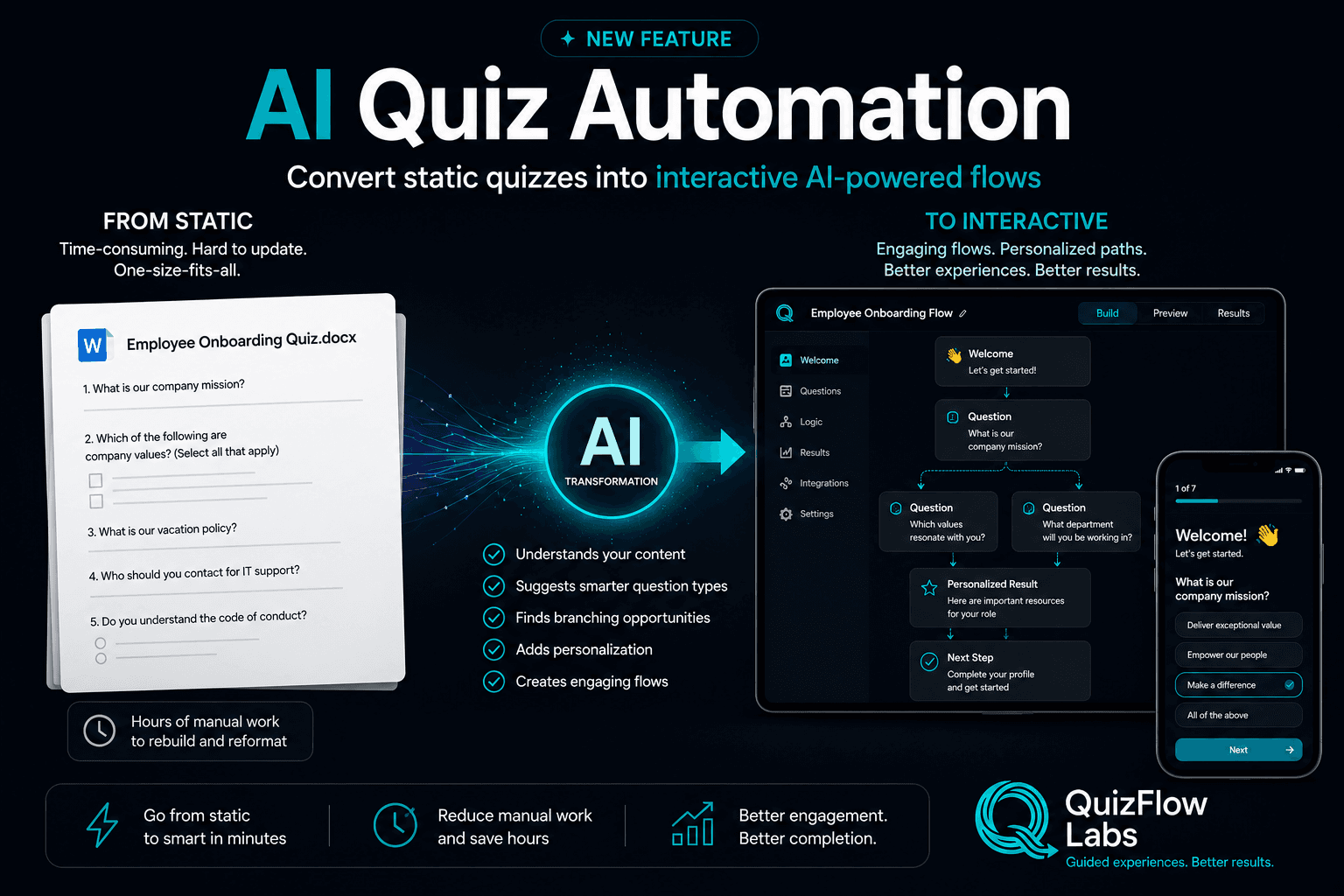
The image for this launch shows the core transformation: from a flat quiz document to an interactive builder and mobile-ready quiz flow. The tool looks for structure in the source content, then helps you decide how the experience should work as a flow.
Understands your content
AI Quiz Automation parses quiz text or a `.docx` file so questions, choices, and instructions can be reviewed inside QuizFlow.
Suggests smarter question types
Static questions can become more useful interactive blocks, such as multiple choice, lead capture, intake questions, or structured decision points.
Finds branching opportunities
When answers should change the next step, the tool can help surface where logic or routing may improve the experience.
Adds personalization
Imported content can become more than a one-size-fits-all quiz by using goals, answer signals, and completion outcomes.
Creates engaging flows
The end result is a draft you can refine into a hosted, embedded, or mobile-friendly QuizFlow experience.
From static to interactive
The best way to understand AI Quiz Automation is as a before-and-after workflow. Before, you have a static document that may be time-consuming to rebuild and hard to keep aligned with your funnel. After, you have a reviewable interactive draft with structure, intent, and next steps.
That shift is especially useful when the quiz already works conceptually but needs to become easier to complete, easier to update, and more connected to business outcomes.
Before: a static document
Questions live in a doc, form, spreadsheet, or old questionnaire. Everyone sees the same path and the same ending.
During: AI-assisted transformation
QuizFlow detects structure, highlights issues, asks what the quiz should accomplish, and suggests improvements for review.
After: an interactive QuizFlow draft
The quiz can become a guided flow with structured questions, lead capture, branching, scoring, results, and completion CTAs.
Where AI Quiz Automation helps most
This feature is strongest when you are not starting from zero. If you already have a quiz, assessment, intake form, or questionnaire, AI Quiz Automation can help you move faster from raw content to a usable interactive draft.
Employee onboarding quizzes
Convert training checks and onboarding documents into clearer interactive knowledge flows.
Client intake questionnaires
Turn static intake questions into guided paths that collect context, files, fit signals, and next-step intent.
Lead qualification quizzes
Transform old lead forms into flows that qualify urgency, budget, service interest, and readiness.
Product recommendation quizzes
Use existing product-fit questions as the starting point for recommendation logic and personalized results.
Training and knowledge checks
Import structured quiz content and review detected questions, choices, and scoring opportunities.
Why reviewable AI matters
The right way to use AI in quiz building is not blind automation. Your quiz may affect lead quality, customer recommendations, training outcomes, intake routing, or booking decisions. That means the final logic should be reviewed by a human who understands the audience and outcome.
AI Quiz Automation is designed around that review step. You can inspect detected questions, clarify the quiz goal, approve or reject suggested improvements, and decide what should become part of the draft.
That keeps the speed benefit of AI while preserving the judgment needed for scoring, branching, personalization, and completion messaging.
How to try it
Start with a quiz you already have. Paste the content or upload a `.docx` file, then review the detected questions and tell QuizFlow what the quiz should accomplish.
From there, you can review suggestions, preview improvements, and move toward a draft that is easier to publish, measure, and improve than the static version you started with.
New feature
Turn your existing quiz into an interactive draft.
Paste quiz content or upload a `.docx` file and use AI Quiz Automation to review, improve, and convert it into a QuizFlow draft.
Try AI Quiz AutomationFAQ
What is AI Quiz Automation?
AI Quiz Automation is a QuizFlow Labs tool that helps convert static quizzes, questionnaires, and intake forms into interactive AI-assisted QuizFlow drafts for review.
What file types can I use?
You can paste quiz text or upload a Word document. Google Docs can be exported as `.docx` files and uploaded for analysis.
Does AI publish the quiz automatically?
No. The tool creates reviewable analysis, recommendations, and draft steps. You stay in control of what gets approved, refined, and published.
What kinds of quizzes work best?
AI Quiz Automation is useful for lead qualification quizzes, client intake questionnaires, product recommendation quizzes, employee onboarding quizzes, training checks, and other structured quiz content.
Can it add branching or scoring?
It can surface opportunities for branching, scoring, outcomes, and completion copy, but those recommendations should be reviewed before they are added to the final quiz.