

Should a Recommendation Quiz Give One Result or a Shortlist?
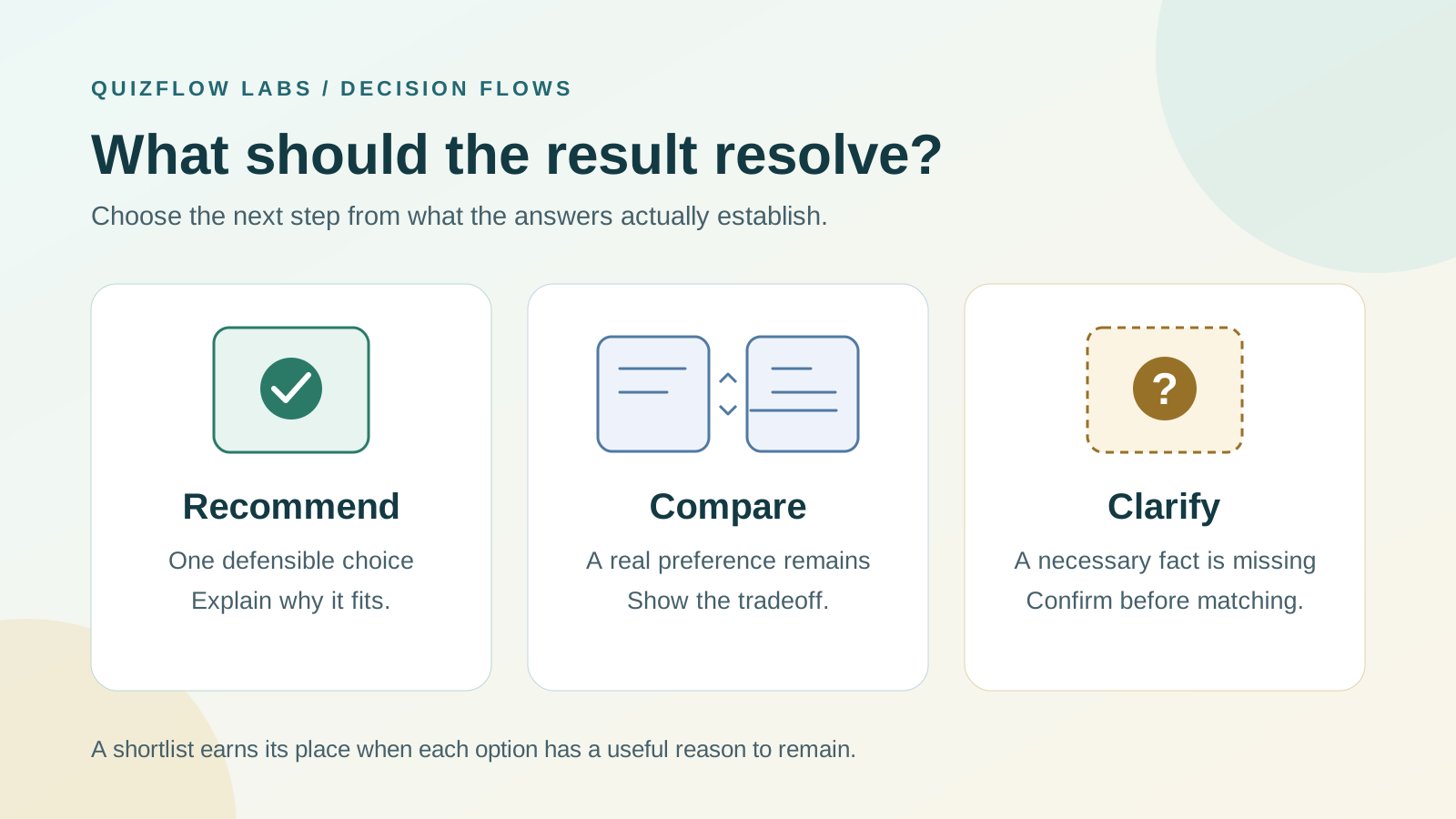
Give one recommendation when the answers settle the choice. Offer a shortlist when suitable options involve a tradeoff the person still needs to make. Missing information calls for a different response.
Let the remaining decision determine the result
A recommendation quiz earns its place by making a choice easier. Its result can do that by naming one suitable offer or by narrowing the field to alternatives with a clear deciding difference. The useful question is how much of the decision the answers have actually resolved.
One result is appropriate when the person's requirements and priorities establish a defensible recommendation. A shortlist is appropriate when several offers meet those requirements but involve a preference the person has not settled. If a missing fact could make an offer unsuitable, clarify that fact before treating the offer as a match.
These are different situations. Showing three products cannot repair an unanswered eligibility question. Naming one winner cannot settle a tradeoff that the quiz never asked about. Choose the result format after identifying what remains uncertain.
Establish fit before deciding how many options to show
Start with requirements that an offer must meet: a supported device, a service area, a firm spending limit or a date by which the work must be finished. An option that fails a requirement does not become a useful alternative because it performs well on less important preferences.
Keep unknown facts separate from failed requirements. An unconfirmed delivery date is not proof that an offer is unavailable, but it is also not evidence that it will arrive in time. Seek confirmation, or explain that availability must be checked before the person can proceed.
After that screening, examine the differences among the suitable offers. Does the customer need to choose between lower cost and more personal support, or between flexibility and a scheduled session? Those differences can justify comparison. Different product names attached to effectively identical benefits do not.
This separation keeps a shortlist from becoming a polite way to display everything. Each included option should have a reason to remain under consideration.
Give one result when you can explain why it wins
A single recommendation needs a reason connected to the answers. Write it before polishing the result card: this option meets the person's requirements and serves their stated priority better than the alternatives because of a specific difference.
Then test the explanation against the strongest alternative. If the customer chose flexibility over personal feedback, a self-paced offer may be the sensible recommendation even though a live service provides more support. Explain both the fit and the limitation. Calling it a perfect match hides the condition on which the recommendation depends.
Also check whether the winner depends on a preference the quiz has not established. Change that unresolved preference while holding the known requirements constant. If another suitable option becomes preferable, either ask about the preference or show the meaningful tradeoff. If the missing detail would not change the choice or its explanation, collecting it may add unnecessary work.
A lead in a score you designed is not, by itself, evidence of a decisive advantage. Two offers can have similar totals for very different reasons. Do not turn a point difference into a confidence percentage without a valid basis for that interpretation.
Check what recommendation quiz scores actually meanMake each shortlist option earn its place
For each alternative, finish this sentence: choose this option over the other suitable option if this difference matters more to you. If the sentence needs a new assumption about eligibility, return to the fit check. If it only repeats a brand slogan, find a useful difference or remove the alternative.
Keep the set as small as the decision permits. Two offers may express the entire remaining tradeoff; a third belongs only when it represents another relevant choice. There is no universal result count that guarantees a better decision. The right size depends on how different the offers are and what the person must compare.
Use the same comparison points and units for every option: total price on the same basis, required time, type of support and an important limitation. Nielsen Norman Group's comparison-table guidance recommends consistent, meaningful attributes so people can compare offerings. A compact comparison can be useful even when the result uses short descriptions rather than a table.
Avoid giving one offer a detailed explanation and the other a vague label. On a phone, keep the deciding difference close to each offer's name and action. Test whether the reader can explain the tradeoff without repeatedly scrolling between descriptions.
Read Nielsen Norman Group's comparison guidanceOpens in a new tabExample: one goal, two useful ways to learn
Consider a hypothetical product-photography educator with three offers: a self-paced lighting course, a live lighting-feedback clinic and a done-for-you studio shoot. The course teaches techniques without individual review. The clinic reviews photos participants have already taken and runs at a specified time. The studio shoot supplies finished images rather than teaching photography.
A visitor wants to improve the lighting in their own product photos, has photos ready for review and can attend the clinic. Both learning offers fit; the studio shoot does not serve the stated goal. If the visitor has not decided whether flexible study or feedback on existing work matters more, a two-option comparison is useful.
The result could say: "Both options help you develop your photography. Choose the lighting course for lessons you can work through on your own schedule; it does not include individual photo review. Choose the live clinic for feedback on the photos you already have; you need to attend at the listed time." Two clearly labeled links can then lead to the relevant offer details.
If the visitor instead identifies personal feedback as the priority, recommend the clinic and explain why. If they cannot attend, do not present the clinic as an immediately usable alternative. If attendance is unknown, show the session time and confirm that the visitor can attend before calling it a fit. The same catalogue therefore calls for different result formats depending on what the answers establish.
Keep the explanation and the next action aligned
A single result should lead to the recommended offer or the next necessary check. A shortlist should make comparison possible before asking for commitment. Sending both results to an unfiltered catalogue makes the person repeat the narrowing work.
Name the action precisely. "View the lighting course" and "Check clinic details" set different expectations from two buttons labeled "Learn more." When a comparison needs more space, use a dedicated page that keeps the relevant offers together and explains their differences.
If an option is presented first or marked recommended, give a customer-relevant reason. A higher price or a business preference for selling that offer does not establish better fit. The Competition and Markets Authority's discussion of online choice architecture identifies ordering and presentation as influences on consumer choice; visual prominence should not stand in for an explanation.
Read the CMA's overview of online choice architectureOpens in a new tabPrepare the result deliberately in QuizFlow Labs
In QuizFlow Labs, use Outcomes to write the result title and explanation, then configure the next actions. The default outcome supports up to two actions, with a button or card presentation. For a two-offer comparison, use the message to explain the deciding difference and give each offer a clearly labeled link action. For a more detailed comparison, link to a page you maintain for those offers.
If you configure Conditional outcomes, QuizFlow checks variable conditions before intent conditions, then score conditions, using list order within each type. The first match supplies the outcome; matching rules do not combine into a list of recommendations. If none matches, the default outcome applies. Put the intended shortlist in that outcome's message and actions. A conditional outcome without replacement actions keeps the default actions, so check the actual buttons as well as the result text on every tested path.
Preview clear matches, unresolved preferences and missing-fact cases. Make sure the explanation, available offers and action destinations agree. A correct title above the wrong buttons still sends the person to the wrong next step.
Configure outcome messages and actionsDiagnose whether the result helps people choose
Before launch, write the expected result and reason for a few contrasting answer sets: a clear preference, a real tradeoff, a failed requirement and an unknown requirement. Check the expected result manually, then run the quiz. This separates a weak recommendation model from a rule that implements a sound model incorrectly.
Ask a tester to explain why each shown offer belongs, what would make them choose the alternative and what happens after the next click. If they cannot distinguish the offers, first check the comparison copy. If they understand the difference but need another fact, improve the information or ask a focused question. If their stated requirement rules out a displayed offer, fix the matching logic.
Treat clicks as clues rather than verdicts. Many clicks on a comparison may mean the shortlist is doing its job, or that the initial explanation is insufficient. Few clicks may reflect poor fit, an unclear action or a decision to return later. Read the pattern alongside observed understanding and the questions people ask; the count alone cannot identify the cause.
Start with one result path. Write why the leading option fits, what would make a suitable alternative preferable and which fact still needs confirmation. Use those three statements to decide whether the next screen should recommend, compare or clarify. Then test that the screen actually helps the person take that step.
Turn answers into action
Build a recommendation flow with a useful next step.
Use QuizFlow Labs to guide the choice, explain the result and connect people to the appropriate next action.
Start building your recommendation flow