How to Update a Decision Funnel When an Offer Changes
A new price, a closed booking window or a different service package can invalidate an otherwise working funnel. Trace the change through its questions, recommendations and destinations before sending more visitors through it.
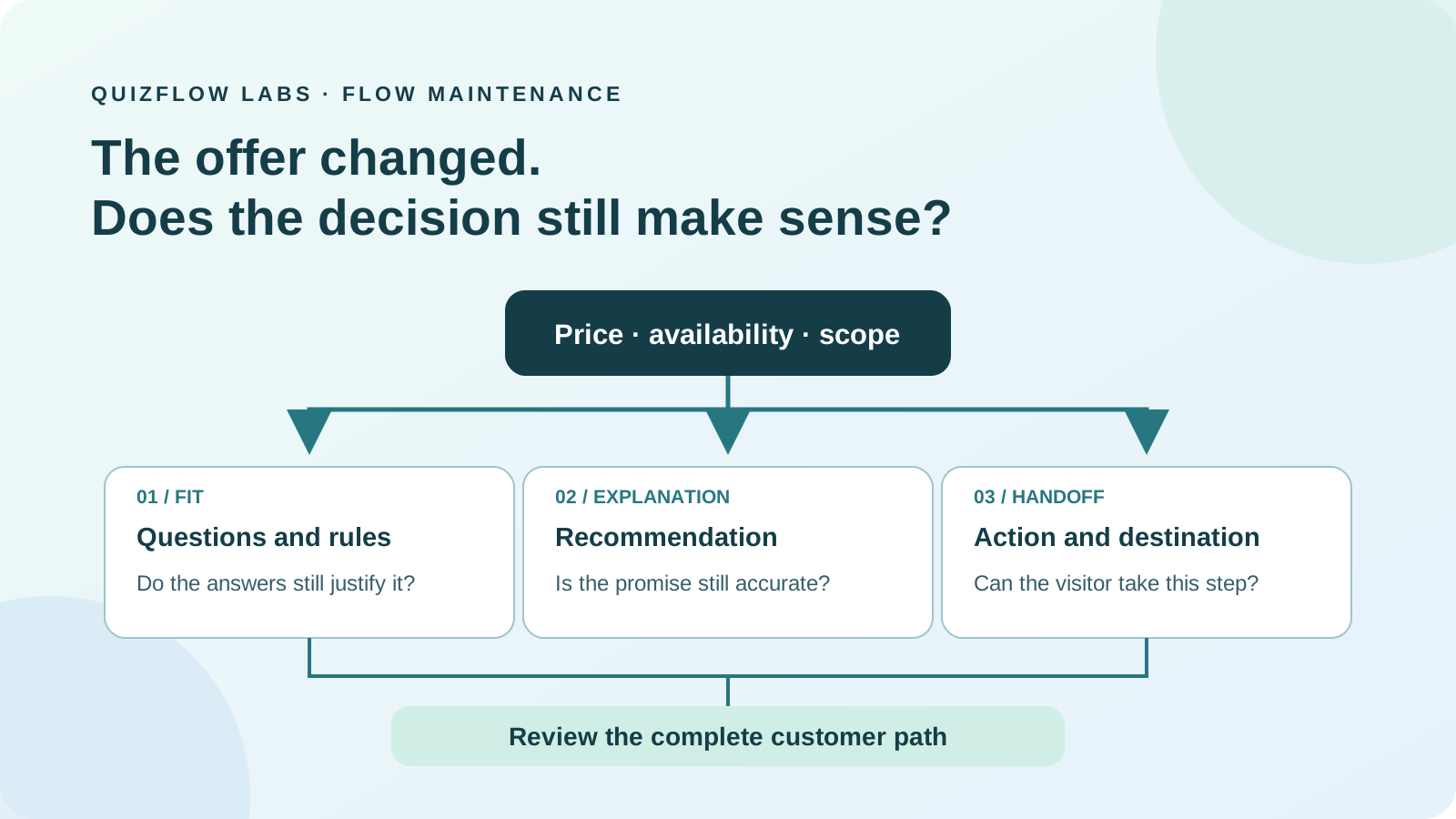
Treat an offer change as a change to the decision
A decision funnel connects a person's answers to an offer and a next action. When that offer changes, a working link is only one part of the maintenance job. The questions may still describe an old package, the recommendation may depend on a benefit that disappeared, or the final button may promise a booking that is no longer available.
Start by asking whether the same answers still justify the same recommendation. If only the web address changed, the decision may remain sound. If the price, scope, prerequisites or availability changed, reassess fit before swapping the destination. A different URL cannot make an unsuitable replacement suitable.
The useful unit of review is the complete path: what the visitor was promised, what the flow learned, why it recommended an offer and what the visitor can actually do next. Reviewing that path keeps a small catalogue update from becoming a misleading customer journey.
Define the change before editing the funnel
Write a short before-and-after note for the offer. Include the changed fact, when it takes effect and who can confirm it. Distinguish the date a booking window closes from the date the event happens. Record a confirmed reopening date only if one exists; an expected return is not a promise of availability.
Then identify what kind of maintenance the change needs. A renamed offer may need new labels without new matching logic. A higher price needs a fresh check wherever budget affects fit. Removing personal feedback from a course changes the recommendation for someone who specifically needs feedback, even if the title and checkout page stay the same.
A temporary closure and a permanent retirement also need different messages. A waiting-list action can be useful during a closure if the business actually maintains that list and explains what joining means. It is a poor substitute for acknowledging that an offer has ended with no planned return.
Give each time-sensitive statement a named owner and a review trigger, such as the booking deadline or the next availability decision. A review date tells someone to check the facts; it does not automatically make an uncertain fact true.
Trace every place the old promise appears
Work backwards from the offer. Find the outcome that recommends it, the rules that select that outcome and the answers those rules depend on. Then inspect the visitor-facing text along those paths: introduction, answer choices, explanatory content, result copy, button labels and linked pages.
Search for more than the offer name. A discontinued package may still be described as "includes a personal review" or "book this month's session." Those phrases matter even when the new product uses the same name. Also inspect the default result: a visitor who matches no special rule must not fall back to the retired offer.
Keep a compact record of each affected place, the claim it makes and the action needed. For example: budget answer leads to a package now above that limit; feedback result promises a review no longer included; final button points to a closed registration page. These are three different repairs, not three broken links.
Check entry points you still control, including embedded flows, campaign pages and saved email templates. For the link in a social media profile, such as Instagram or TikTok, inspect the destination link-in-bio page and its button labels too. Keep the profile URL, the destination page and the actions on that page distinct when deciding what needs updating.
Choose whether to revise, replace or retire the recommendation
Revise the existing path when the offer still meets the need and only its description or destination changed. Replace the recommendation only after checking the alternative against the requirements the flow established. Similar branding, a nearby price or a shared category does not establish equivalent fit.
When no current offer meets the need, retire that recommendation and explain the useful next step. That might be checking future dates, reading a relevant resource or contacting the business about an alternative. State what that action can accomplish. A contact link should not imply that an unavailable service can be booked privately.
GOV.UK's service-retirement guidance starts with how the user's need will be met after a service ends and asks teams to explain what is changing. The same principle is useful for a small business: decide what help remains before choosing where to send the visitor.
Remove questions that existed only to distinguish an offer you no longer provide, unless their answers still support another decision. Keeping them creates work and can suggest that the old service remains available. If the remaining offers no longer require guidance, a clear direct route may serve visitors better than the old quiz.
Read GOV.UK's guidance on retiring a serviceOpens in a new tabExample: the package name stays, but the service changes
Consider a hypothetical brand designer with a packaging-launch package that includes label artwork and coordination with a printer. The designer changes the package to supply artwork only. The name, price and sales-page URL stay the same, but printer coordination is no longer included.
An existing intake flow asks whether the client needs help managing print production and recommends the launch package when they do. Updating the sales page is insufficient: the old answers now select a service that no longer meets that requirement. The link works, but the recommendation is wrong.
Review that question and its dependent result together. If the designer no longer handles print coordination in any service, explain the boundary before asking the client to proceed. The result might say: "This package supplies label artwork. It does not include printer coordination, which you said you need." A link to the revised package details can help the client understand the limit, but should not be labeled as a way to obtain the missing service.
A client who already manages their own printing may still fit the revised package. Test that path separately and make the artwork-only scope clear there too. If a project-review route exists, describe it as a review of what help is possible, not confirmation that the designer will take over production. The maintenance task is to preserve an honest distinction between supported work and unmet needs.
Make the destination and action tell the same story
Update the visible action as well as its URL. "Book the workshop" is inaccurate if the destination now lists future dates. "Check future workshop dates" describes that narrower action. W3C's explanation of link purpose says people should be able to determine a link's purpose from its text or associated context.
Open the destination without an owner's signed-in session. Check the final page after any redirects, the offer details, relevant dates and whether the advertised next action is available. A page loading successfully does not prove that the visitor can buy, book or request what the funnel promised.
Plan separately for old offer URLs that people may reach from bookmarks or previous messages. When an equivalent page has moved, a redirect may be appropriate. If there is no equivalent but visitors still need an explanation, a closure page can state what ended and describe relevant alternatives. If the page is removed instead, ask the person maintaining the site to return the appropriate not-found response. Avoid silently sending everyone to an unrelated bestseller.
Google's redirect documentation distinguishes permanent moves from temporary redirection, while its error guidance allows removed pages without replacements to return a proper not-found response. An HTTP redirect is a technical routing choice; it is not evidence that two offers meet the same need. Keep that customer-fit decision separate.
Review the outcome and its fallback in QuizFlow Labs
In QuizFlow Labs, review the result in Outcomes and its next steps under Actions. For a link action, check the button text and destination together. If a changed offer affects questions or explanations earlier in the flow, update those too; changing the final message alone leaves the earlier promise intact.
If the flow uses Conditional outcomes, inspect the default outcome as well as each affected rule. Conditions are evaluated by type: variable conditions first, then intent, then score, with list order within each type. The first match wins; if none matches, the default applies. A conditional outcome without replacement actions keeps the default actions, so removing an obsolete action from one rule alone may not remove it from the result.
Use a confirmed business fact to maintain the flow. Do not assume that a link to a booking page makes a recommendation aware of remaining places or a closing date. Preview the complete paths and verify the actual destination before making the updated experience available.
Review Outcomes and action settingsTest the changed decision, then diagnose the first mismatch
Write the expected result before running each test. Include a person who previously qualified for the changed offer, one who still fits an unaffected offer and someone who should reach the default. For a price change, test the budget boundary. For a scope change, test the need that the removed benefit used to serve. These cases check the business decision rather than merely confirming that every button opens.
Read the path in order and stop at the first mismatch. If the questions still advertise the old benefit, fix the promise. If the answers select an unsuitable replacement, fix the fit criteria or rule. If the right result appears above the wrong button, inspect its action configuration and inherited defaults. If the destination contradicts an otherwise correct flow, repair the handoff.
After the update is live, review affected paths using counts with clear denominators where those records are available. Compare action clicks with the number of visitors shown that outcome, rather than mixing changed and unchanged routes. Once registration closes, the original booking opportunity is gone; comparing booking counts as though the offer were unchanged would misread the update. More clicks on future dates may reflect interest or uncertainty, so check the destination and questions people ask before drawing a conclusion.
Start with the next offer change on the calendar. Name the changed fact, trace the paths that rely on it, choose a truthful next action and test one affected path alongside an unaffected one. Keep the review owner and next trigger with that record. A maintained funnel remains useful because its recommendation still makes sense when the visitor reaches the other side.
Turn answers into action
Build a flow that leads to the right current offer.
Use QuizFlow Labs to connect clear questions, useful outcomes and relevant next actions. Start with one customer decision and test the complete path.
Start building your decision flow