

Should a Client Intake Form Ask for a File or a Link?
Choose supporting material by what the reviewer needs to decide. A short explanation, a shared link and an uploaded copy solve different problems—and each can fail in a different way.
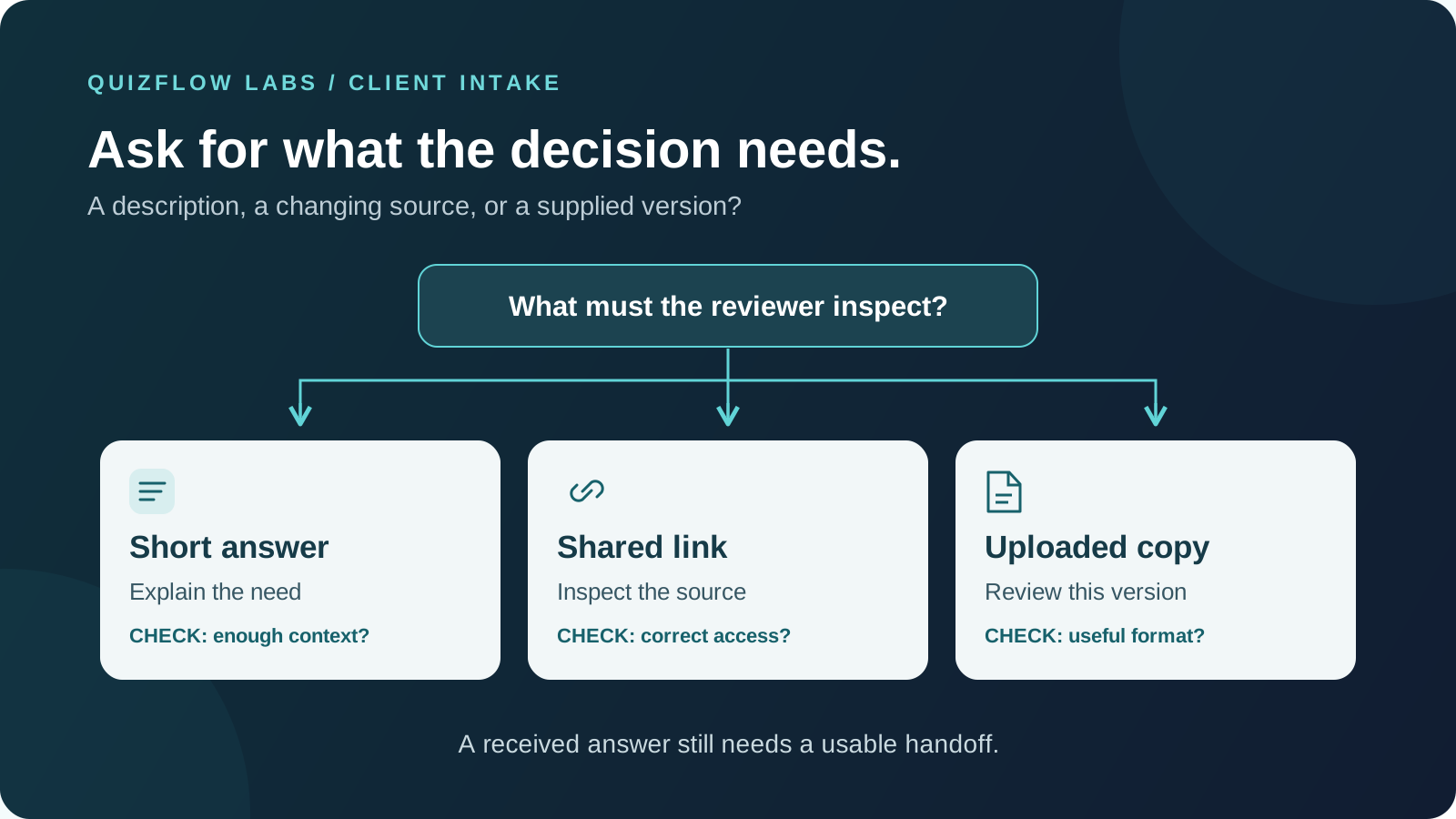
Start with the decision, then choose the material
Supporting material belongs in client intake when it helps someone make the next decision. Asking for a file simply because a form can accept one gives the client work without establishing what the reviewer will learn. Asking for a link instead can remove an upload step while creating a permissions problem.
Write the reviewer's task before choosing the field: decide whether the project fits the service, estimate the scope, or prepare a specific part of a consultation. Then name what the reviewer must inspect to do it. A description of the goal may settle fit. A sample page may reveal layout complexity. An entire project folder may add nothing to either decision.
Test the dependency: could the reviewer choose and prepare for the same next step just as well without this material? If so, defer the request until it has a purpose. A file may help prepare a call even when it does not change whether the call happens. If a meaningful estimate depends on seeing the work, explain that dependency rather than asking for generic supporting documents. GOV.UK's file-upload guidance similarly reserves upload requests for material critical to delivering the service.
Read GOV.UK's guidance on when to request uploadsOpens in a new tabMatch the format to the kind of evidence
The useful distinction is not which format looks more professional. It is whether the decision needs an explanation, access to a working source, or a particular supplied version.
A short answer explains the need
Use text when the reviewer needs the goal, constraint or reason for asking. A client can describe the audience for a presentation without producing a brief. Text is a poor substitute when the reviewer actually needs to examine layout, image quality or a passage of writing.
A shared link points to a source
Use a link when the work already lives online and the reviewer needs that source, such as a public portfolio or a shared working document. Access permissions and later edits become part of the handoff. The link alone does not establish which version the reviewer saw.
An uploaded copy supplies a version
Use an upload when the review needs the supplied copy rather than the changing original, or when the material is held on the client's device. Choose a format the team can inspect. A PDF can show the appearance of a slide deck without giving the reviewer the editable slides needed for a separate editing task.
A copy is not proof that its contents are accurate, complete or current. A live link is not proof that the reviewer has access. For a decision that depends on timing, record the relevant version or review date in the team's process. Choose that process deliberately instead of assuming the field type provides it.
Request the smallest useful sample
Name the material, its purpose and its boundaries. Compare "send your project files" with "send one representative slide that shows the layout problem you want help with." The second request tells the client how to choose and gives the reviewer a defined question to answer.
Explain what makes a sample representative. If the estimate depends on the hardest layout, ask for a complex slide rather than a polished title slide. If the question is visual consistency, ask for a small range showing the different layouts. One sample cannot establish the effort required for an unseen deck, so label an early estimate as provisional and say what later review will settle.
Also say what to leave out. Ask clients to use material they are allowed to share and remove unrelated names, account details or confidential content. Do not request passwords to make a link work. If removing details would destroy the evidence the reviewer needs, arrange an appropriate review method before collecting the original. A routine intake field is not a reason to gather an entire client archive.
Treat link access as part of the request
A link that opens for its owner can still be unusable for the reviewer. Microsoft's OneDrive and SharePoint documentation distinguishes links for anyone who has them, members of an organization, and specific people. A specific-people link requires the recipient to authenticate as an authorized person; an organization-only link will not serve an outside reviewer.
If a review uses restricted sharing, tell the client which business account to authorize and whether viewing is enough. Verify access as that intended recipient. A private browser window is useful for checking a deliberately public link, but it cannot establish whether an authorized recipient can use a restricted one.
Do not solve every access failure by making the document available to anyone with the link. That changes who can open it. Correct the intended recipient's access, request a suitable copy, or arrange another review method. If the team needs to retain evidence of what it reviewed, agree how the version will be recorded; a working link may later point to edited content or stop working.
See Microsoft's explanation of sharing-link permissionsOpens in a new tabA worked example: scoping a presentation redesign
Consider a hypothetical presentation designer offering an introductory fit call and a separate redesign estimate. The fit call establishes the audience, deadline and type of help. It does not require slides, so the first intake asks for those facts in words and explains that no deck is needed yet.
The estimate requires visual inspection. For that stage, the designer asks for three slides showing the main layout types, including a complex one, plus the total slide count. Three is a practical choice for this example, not a universal sample size. A deck with many unique layouts may need a broader review before the designer can commit to a scope.
The request reads: Share a view-only link to a review copy containing three representative slides, including one complex slide. We use them to assess layout work for a preliminary estimate. Remove confidential content and tell us the total number of slides. Share access with the review address shown here. If you cannot share slides, describe the layouts and we will arrange another way to assess scope.
The designer supplies the actual business review address beside that instruction. If the material cannot be shared, the next step is clarification rather than a firm estimate based on an empty field. If a fixed copy is needed for the estimate record, the designer requests it through the agreed file-transfer process instead of treating an editable link as a permanent snapshot.
This separates two decisions that a single generic attachment request would blur. The fit call needs a description; the estimate needs inspectable examples. Neither stage needs unrestricted access to the client's whole workspace.
Make the request usable before the client starts
For uploads, state the accepted formats, size limit and number of files before selection. Choose these around what the reviewer needs, not around the largest allowance the tool offers. The NSW Design System recommends showing restrictions up front, allowing suitable formats and considering people with limited bandwidth or data.
For links, describe the expected destination and permissions. A link to a specific review document is different from a folder containing dozens of unexplained files. If the document is long, ask which page or section the reviewer should inspect. Keep the purpose beside the request so clients do not need to remember instructions from an earlier email.
Provide a way to explain that the material is unavailable or cannot be shared. That answer should lead to an honest next step: a clarification conversation, a different review method or a deferred estimate. An alternative should preserve the decision's evidence requirement, not quietly waive it.
Read the NSW guidance on usable file requestsOpens in a new tabTest whether the reviewer can use the answer
A successful submission is only the start of the handoff. Before publishing, use invented, non-sensitive material to run the request from a client's device through to the person who will review it. Include a phone if clients are likely to respond on one.
The client can choose the right material
Ask a tester to explain what they would send and why. If they choose a title slide when the reviewer needs a complex layout, improve the instruction before changing the upload control.
The intended reviewer can inspect it
Check a valid file or link, then try a wrong format, an inaccessible link and an unavailable-material answer where relevant. Confirm that the reviewer gets the purpose and location of the evidence, not just a filename or URL.
Failure leads to a useful next step
Check what the client can do after an error and what the team does when evidence is missing. Correcting access or providing an acceptable alternative should be understandable. An estimate must remain pending if the necessary inspection has not happened.
Repeat the review after the expected waiting period if links or document versions may change. Passing an immediate test does not establish that the material will still be accessible when the team picks up the request.
Diagnose unusable material before adding more fields
Keep a simple record of whether material was requested, received, accessible and sufficient for the intended decision. Count replacements and clarification requests separately. A replacement caused by a broken link is a different problem from a readable sample that shows the wrong thing.
Repeated access failures point first to sharing instructions and recipient identity. Wrong samples point to the selection prompt. Readable but insufficient samples suggest the evidence request does not cover the decision. If reviewers routinely ignore the material, investigate whether the request belongs at that stage at all.
Interpret omissions too. If people who can describe a suitable project cannot supply a file yet, requiring it may exclude unfinished projects rather than identify poor fit. Ask why the material is missing before inferring the cause. If evidence is genuinely essential, keep the boundary but offer a clear preparation step. If it is merely useful, defer it and see whether the team can still make the next decision.
Compare like requests: the same review purpose, stage and instructions. Report counts and the relevant denominator, such as access failures among submitted links. Fewer clarification emails alone do not prove a better intake process; check that reviewers can reach a sound decision and that clients who need another review method still have a workable path.
Build the intake around the next action
In QuizFlow Labs, a Text Response can collect a focused description or a pasted review link. Put the purpose and sharing instructions in the prompt, and keep the material request separate from the explanation when the reviewer needs both. Treat a pasted URL as information for review, not as confirmation that access works or that the linked content has been inspected.
Start with one intake decision. Write down what evidence would change it, choose the least demanding format that preserves that evidence, and test the complete handoff. Add another request only when it answers a question the reviewer still cannot resolve.
Turn answers into action
Build an intake flow with a clear next step
Use QuizFlow Labs to collect the context behind a request and guide people toward a useful next action. Start with the decision your intake needs to support.
Start building your intake flow