

How to Turn Workshop Feedback Into Your Next Improvement
A method for interpreting sparse or conflicting workshop feedback, separating evidence from assumptions, and checking whether the next change helps learners.
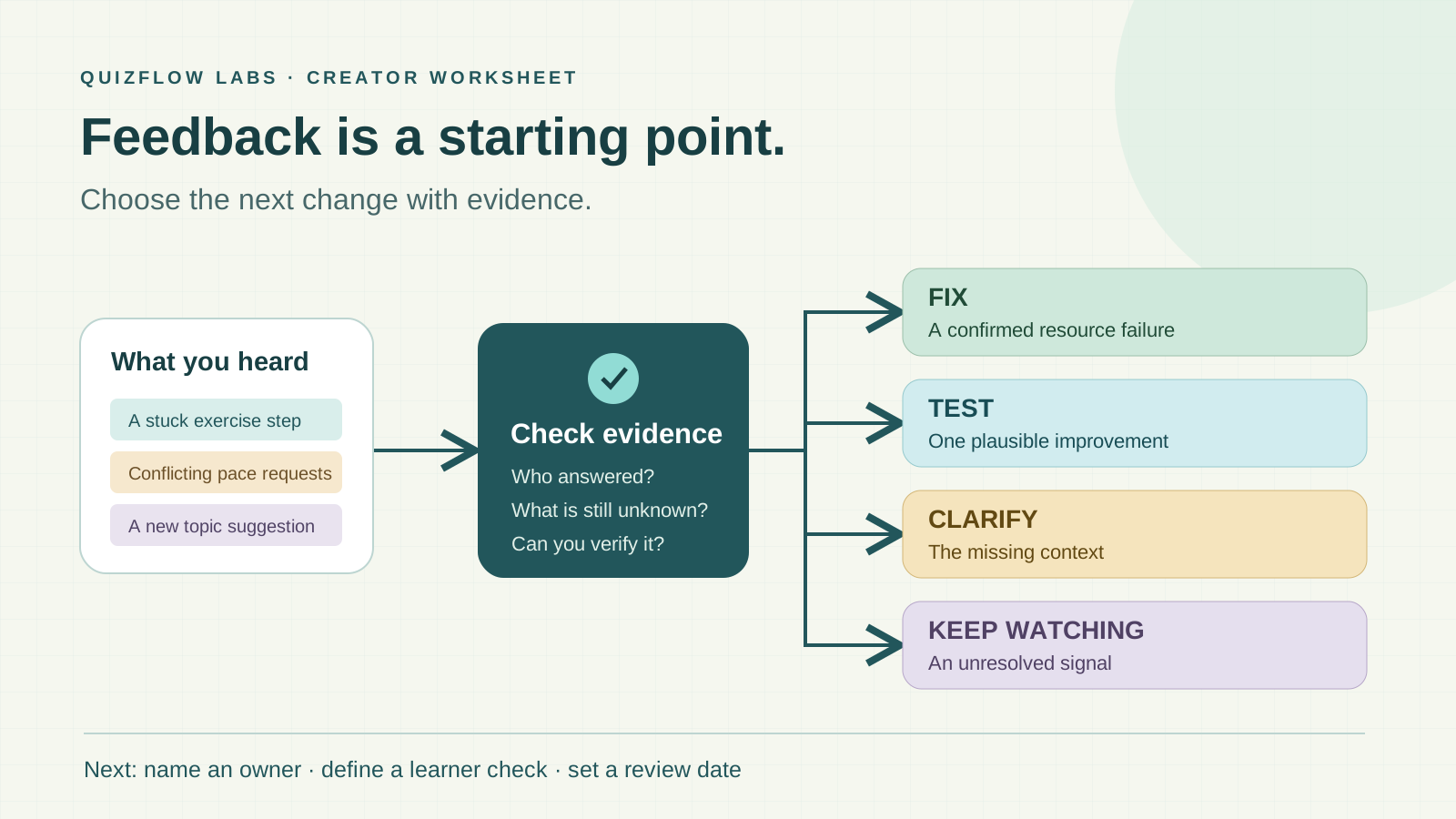
What workshop feedback can tell you
Workshop feedback helps identify obstacles, unmet expectations and aspects of the learning experience worth preserving. Its value comes from connecting those observations to a decision about the next session.
Ratings, comments and demonstrated performance answer different questions. A satisfaction rating describes how a respondent evaluated the experience. A comment can identify a specific difficulty. Watching a learner complete a task shows whether they can perform that task under the conditions observed.
A high rating does not establish that the skill was mastered, and a low rating does not reveal the cause. Effective review uses each kind of evidence for the question it can answer, rather than treating a single score as a verdict on the workshop.
Choose the improvement question before analyzing responses
Start with the promised learning outcome and one decision the feedback should inform. “What prevents learners from completing the practice exercise?” gives the review a narrower target than “How can the workshop be better?”
Match the collection timing to that question. Feedback immediately after a session can describe pacing, instructions and access to materials. A question about applying the skill at work needs a later opportunity for learners to use it.
Keep the session date, intended audience, question wording and collection window with the responses. Those details matter when comparing sessions: a change in the audience or the question can produce different answers even if the workshop itself is unchanged.
Keep counts and missing information visible
Report how many people were invited, how many responded and how many answered the particular question. In an illustrative workshop with 20 attendees and eight respondents, three requests for more examples describe three respondents’ views. They do not establish the views of the other attendees.
Use the number answering each question when summarizing it. If six answered the pacing question, a count from that question belongs with those six answers. Keep blanks, “Not applicable” and explicit negative answers distinct.
Voluntary respondents may differ from nonrespondents. Treat that as a limit on the conclusion, not a reason to ignore the feedback. A small response set can reveal a specific problem worth checking; it is a weaker basis for a claim about how all attendees felt.
Group comments without losing what they actually say
Read individual responses before counting themes. Group concrete observations such as difficulty locating a setting, unclear exercise instructions or problems accessing a worksheet. Keep a note of the session component each theme concerns.
Use consistent counting rules. One person who mentions export settings three times is still one respondent reporting that issue. One response may contribute to more than one theme, so theme counts may exceed the number of respondents. Explain that if presenting a summary.
Do not combine opposite comments into a single label that hides the disagreement. “Too fast” and “too slow” may concern different sections, starting skills or attendance. Retain the distinction and look for context before revising the whole session.
Separate the observation, explanation and action
An observation is what was reported or seen. An explanation is a possible cause. An action is the change or check that follows. Keeping these separate prevents a plausible guess from becoming the reason for an expensive redesign.
For example: “Three respondents could not find the export setting” is an observation. “The demonstration did not make the location clear” is an explanation. “Add a labelled example and watch learners attempt the export” is an action. A different software version could also explain the difficulty.
Fix a confirmed failure
Verify a broken link, incorrect instruction or access problem directly. Repair it and check the affected task again.
Test a plausible improvement
When the cause is uncertain but the obstacle is specific, try a focused change and define the learner behavior to observe.
Clarify conflicting feedback
Ask which section was difficult, what the learner expected and what they already knew before choosing a broad change.
Record an out-of-scope request
Keep requests that do not serve the promised outcome for a separate resource or future offer review. Frequency alone does not make them suitable.
Prioritize severity and relevance alongside frequency. A single confirmed access failure can block learning. Several requests for an advanced topic may still fall outside a beginner workshop’s purpose.
Worked example: deciding what to change in a video workshop
Consider an illustrative beginner workshop that promises one exported video. Eight attendees respond: three describe trouble finding export settings, two want a faster explanation of editing tools, and one requests advanced colour grading.
The export problem is closely tied to the promised outcome. A useful next step is to check whether instructions match the software learners use, then test a labelled export example during practice. The success check is whether learners can locate the setting and export the clip.
The pacing comments need more context. Shortening the explanation could help experienced attendees while making the workshop harder for beginners. Ask which section felt repetitive and compare that with the intended starting skill level.
The colour-grading request can be retained for a follow-up resource without expanding the beginner session. The resulting plan has a focused learning check, a clarification question and a future consideration, rather than three automatic additions to the agenda.
Collect context that supports the next decision
Use specific, separate prompts. “At which step, if any, did you get stuck?” identifies the obstacle. “What would have helped at that step?” asks about a possible improvement. Asking both in one long question can make it unclear which part someone answered.
Pair structured choices with written context when both have a purpose. A choice can identify the exercise or section; a written response can explain the difficulty. Avoid asking for details that have no bearing on the improvement decision.
QuizFlow Labs Text Response blocks support written feedback alongside structured questions. Review the individual answers before turning them into themes. If exports are available in the account, they can support a separate analysis workflow; inspect the fields before deciding how to count responses.
Use Text Response blocks for feedbackEvaluate the change against learner behavior
Record what will change, who is responsible, when it will be checked and what successful learner behavior looks like. “Locate the export setting and produce the clip” is more informative than “Get better feedback.”
Observe the same relevant task after the revision and collect feedback at a comparable point. Keep the conditions in view: a different audience, instructor or software version can affect the result. An improvement across sessions may be encouraging without proving that one change caused it.
Preserve evidence about what already works. A narrowly targeted change is easier to evaluate than simultaneously changing the agenda, exercises, pace and materials. If the task remains difficult, revisit the explanation rather than adding more content by default.
Close the loop with a clear decision
Tell participants what was changed, why it was chosen and what still needs investigation. A useful update might explain that export instructions were revised, pacing comments are being clarified and advanced topics will be considered separately.
Use the same short decision record at the next review: observation, possible cause, action, owner and learner check. This turns workshop feedback into a repeatable improvement process while keeping uncertainty visible and the promised learning outcome central.
Design useful feedback
Collect answers that support a clear next action
Build a feedback flow with focused questions and written context, then use the responses to plan and evaluate an improvement.
Read the feedback survey guide